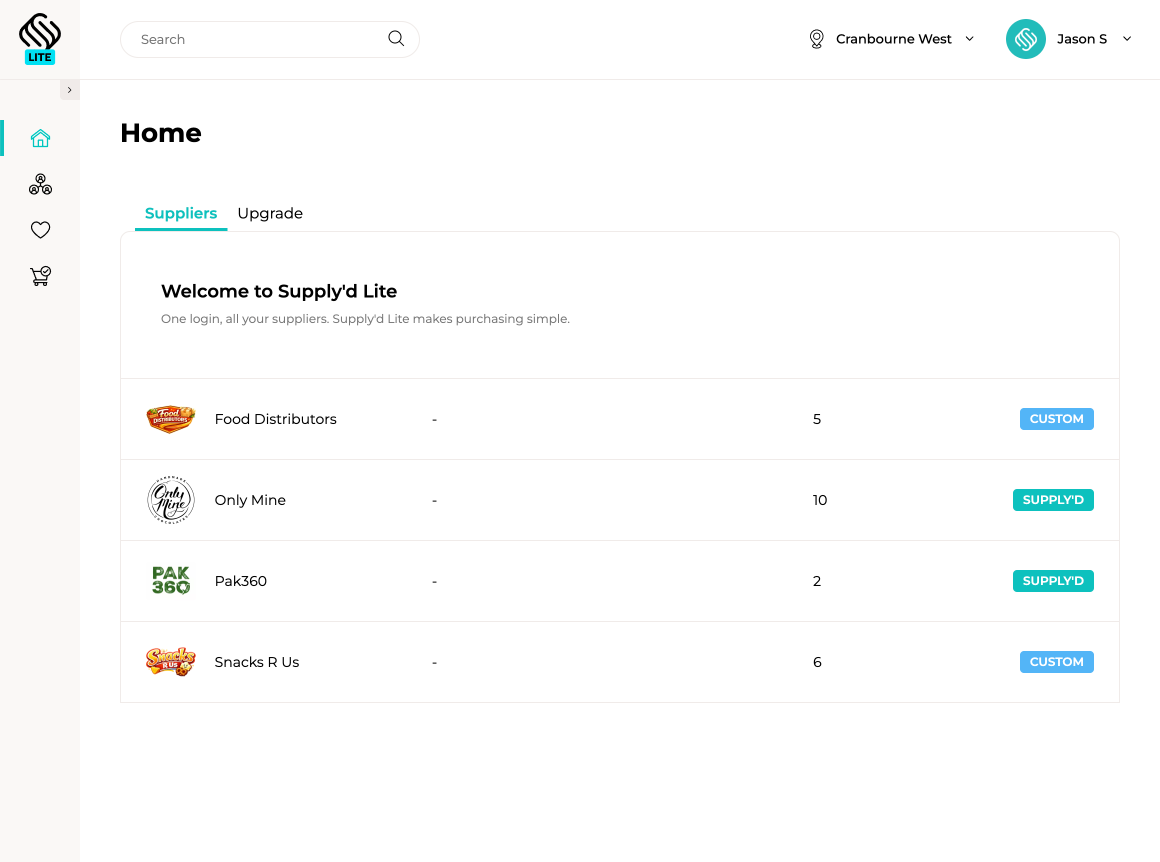
Stop switching between supplier portals, spreadsheets, paper lists and old email threads whenever stock needs to be ordered. Supply’d Lite gives your team one place to manage suppliers, prepare purchase orders, keep order history and quickly reorder regular products.
Add any supplier to Supply’d Lite, even when they do not use Supply’d. Create purchase orders in one consistent format and send them directly by email, giving your team one ordering process across the business.
Connect with suppliers already using Supply’d and order directly from their live product range. Access current products, pricing and ordering information shared by the supplier, reducing outdated spreadsheets, missing details and manual order handling.
Build supplier orders as products are needed, then review and send each purchase order when it is ready. Supply’d Lite keeps your order history together, making it easy to see what was previously purchased and use an earlier order as the starting point for the next one.
Supply’d Lite gives smaller food businesses a practical way to organise purchasing without paying for a full ERP. As your operation becomes more complex, you can move to Supply’d ERP for connected inventory, production, warehouse, sales, delivery, quality and business intelligence while retaining the same Supply’d platform.
Explore Supply'd ERP Powered by Supply'd ERP
Businesses using Supply’d ERP can invite customers to order through Supply’d Lite for free. Customers get one simple place to browse products and send purchase orders, while those orders flow directly into the supplier’s Supply’d sales workflow, reducing emails, spreadsheets and manual order entry.

Create your free Supply'd Lite account and achieve complete clarity and control over all your supplier orders in a single, unified hub.
Join Supply'd LiteSupply'd Lite is free purchasing and purchase order software for food businesses. It gives your team one place to manage suppliers, prepare purchase orders, retain order history and reorder regular products.
Yes. Supply'd Lite can be used free of charge to manage suppliers and create purchase orders.
Supply'd Lite is designed for food retailers, cafes, restaurants, bakeries, hospitality businesses, manufacturers and other businesses that regularly purchase products or ingredients from suppliers.
No. Supply'd Lite is a standalone free product and can be used without subscribing to Supply'd ERP.
No. You can add and order from any supplier, even when they do not use Supply'd. Purchase orders can be sent to those suppliers by email.
Yes. Any supplier can be added manually so your team can maintain one consistent purchasing process across the business.
Yes. You can connect with participating suppliers that use Supply'd and order directly from the product and pricing information they share with you.
Connected suppliers can share current product, pricing and ordering information directly through Supply'd, reducing reliance on outdated spreadsheets, catalogues and manual product entry.
Yes. Products shared by a connected supplier can be viewed and added to purchase orders within Supply'd Lite.
Connected product and pricing information can reflect the details made available to your business by the supplier.
Yes. You can create purchase orders containing the supplier, products, quantities and other relevant order information.
Yes. Purchase orders for suppliers not using Supply'd can be emailed directly from the purchasing workflow.
Yes. Orders placed with connected Supply'd suppliers can flow directly into the supplier's Supply'd sales workflow.
Yes. Purchase orders can be prepared and reviewed before they are sent to the supplier.
Yes. An order can remain in progress while products and quantities are added before it is reviewed and sent.
Where maintained or shared by the supplier, relevant minimum-order information can be considered while preparing the purchase order.
Yes. Previously created purchase orders remain available so your team can review what was ordered and when.
Yes. Previous purchase orders provide a record of the products and quantities ordered from each supplier.
Yes. An earlier purchase order can be used as the starting point for a new order, allowing your team to adjust only the products or quantities that have changed.
Yes. Purchase history and favourite products make it easier to find and reorder products your business purchases regularly.
Yes. Frequently purchased products can be maintained as favourites for faster access when preparing future orders.
Yes. Supply'd Lite provides one place to maintain and order from multiple suppliers, regardless of whether each supplier uses Supply'd.
Relevant supplier information can be maintained so purchase orders are prepared and sent to the correct business and contact details.
Supply'd Lite can provide a shared purchasing process so authorised team members can prepare and review supplier orders using consistent supplier and product information.
It can reduce reliance on spreadsheets and manually written email orders by giving your team one structured purchase order workflow across suppliers.
Supply'd Lite can centralise purchasing across connected suppliers and suppliers that accept emailed purchase orders, reducing the need to switch between multiple ordering processes.
Yes. Supply'd Lite is cloud-based and can be accessed through a supported web browser.
No traditional desktop installation is required. Supply'd Lite runs through a supported web browser.
Supply'd Lite is primarily designed for supplier ordering and purchase order management. Businesses requiring connected inventory, warehouse, production and fulfilment management can upgrade to Supply'd ERP.
No. Production planning, recipes, batches, costing and traceability are available through Supply'd ERP rather than Supply'd Lite.
Supply'd Lite is focused on purchasing from suppliers. Full sales order management is available through Supply'd ERP.
Supply'd Lite provides free supplier ordering and purchase order tools. Supply'd ERP adds connected product, sales, purchasing, inventory, warehouse, production, delivery, quality and reporting capabilities for more complex businesses.
Yes. Businesses requiring more advanced operational management can move to Supply'd ERP while remaining within the Supply'd platform.
An upgrade may be appropriate when the business needs connected inventory, sales orders, production, warehouse scanning, delivery management, batch traceability, quality controls or more advanced reporting.
Suppliers using Supply'd ERP can invite customers to order through Supply'd Lite, giving buyers a free and consistent ordering experience while reducing manual sales-order entry for the supplier.
Yes. Supply'd ERP businesses can invite customers to register for Supply'd Lite and connect with their shared product range.
No. Customers can use Supply'd Lite free of charge to place orders with connected suppliers.
Yes. Orders sent through a connected Supply'd relationship can flow into the supplier's sales-order workflow for review and fulfilment if they use Supply'd ERP.
Yes. Connected customer orders can reduce the need for suppliers to manually re-enter orders received through email, spreadsheets or telephone calls.
Suppliers using Supply'd can share current product and ordering information with connected customers through the platform.
Yes. A Lite user can connect with multiple participating suppliers while also maintaining suppliers that receive orders by email.
Yes. Cafes and restaurants can use Supply'd Lite to organise supplier ordering and purchase order history without implementing a full ERP system.
Yes. Food retailers can use Supply'd Lite to order products from wholesalers, distributors, manufacturers and other suppliers in one place.
Yes. Smaller manufacturers can use Supply'd Lite for purchasing before moving to Supply'd ERP when they require inventory, recipes, production planning and batch traceability.
Supply'd Lite can provide a consistent purchasing process, though businesses requiring advanced multi-location inventory and operational control may be better suited to Supply'd ERP.
Create a free Supply'd Lite account using the registration option on this page, then add suppliers or connect with participating Supply'd suppliers to begin ordering.