






Only Mine
Gourmet chocolate manufacturer.
View case study
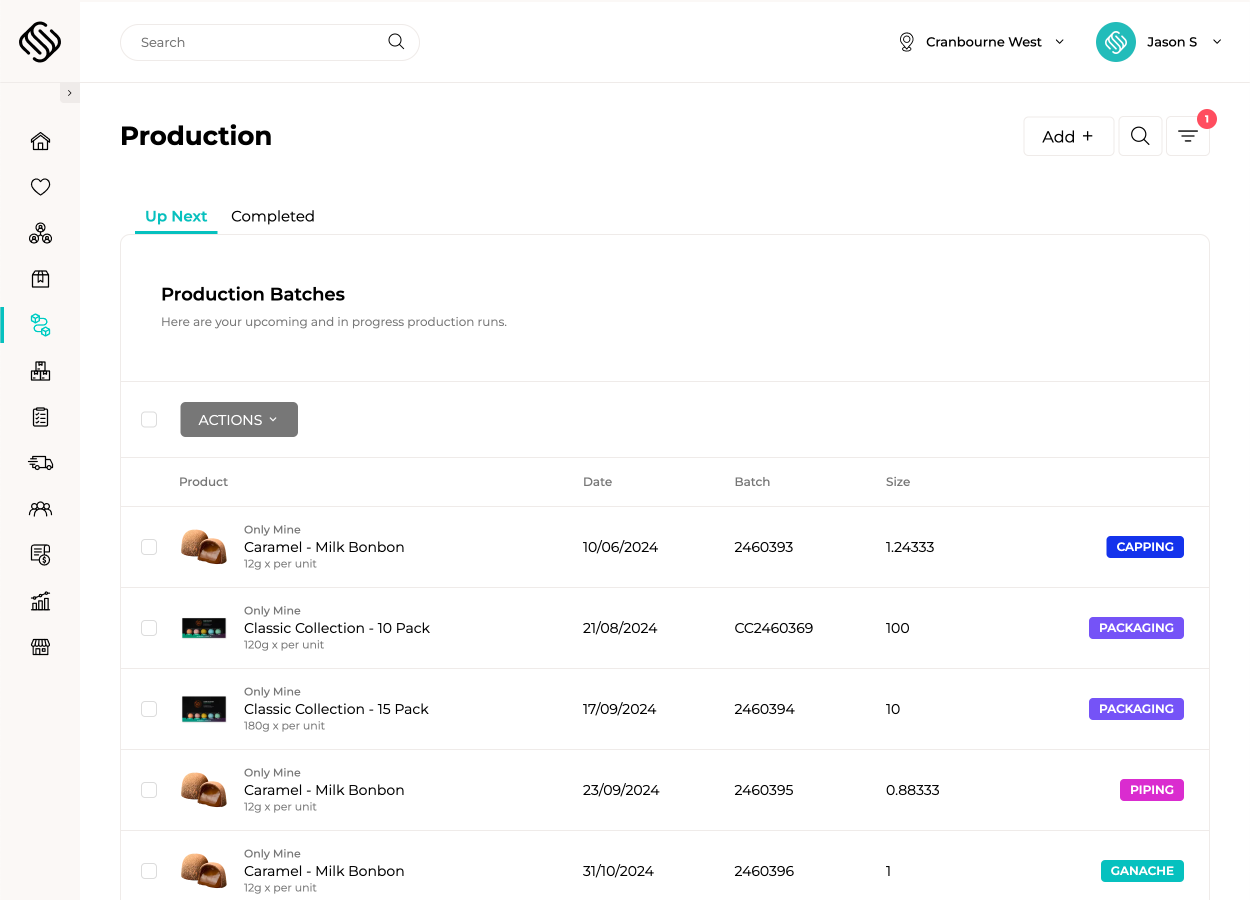
Connect recipes, production plans, ingredients, labour, outputs, costs and batch records in one central platform. Supply’d keeps production connected with sales demand, purchasing, inventory, warehouse and fulfilment so every team works from the same plan and actual results.
 Powered by Supply'd Intelligence
Smart Production Planning brings together sales orders, delivery dates, minimum stock levels, current inventory and forecast demand to recommend what should be produced. Required sub-recipes and intermediate products are included automatically, giving your team one clear production plan before work begins.
Food-safe touch screens guide staff through every ingredient while supported Wedderburn scales confirm the correct quantity has been reached. Supply’d checks each ingredient is within the required tolerance before the workflow continues and prevents ingredients from being skipped, improving consistency and reducing avoidable batch errors.
Manage recipes, sub-recipes and production stages from preparation through to finished goods. Record actual ingredient usage, labour time, output and yield as work is completed, giving your team a clear view of production performance and variance at every stage.
Configure approved ingredient substitutions and select the products actually used during production. Supply’d can recalculate product costs, ingredient statements, allergens and nutritional information based on the substituted ingredients, helping flexibility remain controlled and traceable.
Guide staff through breaking one input into multiple finished products, by-products and waste using supported connected scales. Supply’d records the actual weight of every output, calculates yield and cost across the full breakdown, and retains traceability back to the original batch.
Calculate production costs using current ingredient and packaging prices, actual labour and configured overheads. Supply’d separates material, labour and overhead costs so your team can understand the true cost, margin and yield performance of every production run.

Link the specific ingredient and packaging batches used in production with the finished products created. Supply’d maintains traceability through production, inventory, fulfilment and customer orders, helping your team investigate issues, isolate affected stock and respond quickly when a recall is required.

Explore how food manufacturers, bakeries, wholesalers and retailers use Supply’d ERP to run their operations.
Book a demoSupply’d ERP is built around the workflows food manufacturers, distributors and retailers rely on every day.
Supply’d is built around the way food and retail businesses actually operate. We combine deep industry understanding with connected technology to deliver production management software that improves control, reduces manual work and connects teams across the operation.
Production management software helps food businesses plan, run and record manufacturing in one connected workflow. Supply'd connects recipes, production requirements, ingredients, labour, outputs, costs, yields, batches and traceability with purchasing, inventory, sales orders and fulfilment.
Yes. Supply'd is built for food manufacturers, bakeries, butchers, central kitchens, wholesalers and retailers with production operations. It supports food-specific workflows including recipes, batches, expiry dates, allergens, substitutions, weigh-up, yields and traceability.
Yes. Supply'd can bring together customer orders, delivery dates, forecast demand, minimum stock levels, current inventory and existing production plans to recommend what needs to be produced.
Yes. Demand from confirmed sales orders can feed directly into production planning, helping your team understand which products must be made, in what quantity and by when.
Yes. Production planning can consider minimum stock or hold levels alongside demand and current inventory, helping teams maintain suitable finished-product availability.
Yes. When a finished product requires sub-recipes or intermediate products, Supply'd can include those requirements within the production plan so each stage is prepared in the correct sequence.
Yes. Supply'd supports recipes, sub-recipes and intermediate products. Sauces, doughs, fillings, bases, stocks and other components can be produced as their own batches and then used within finished products.
Yes. Production workflows can include multiple stages such as preparation, mixing, cooking, cooling, resting, cutting, packing and quality checks. Each stage can remain connected with the relevant batch and production record.
Yes. Production stages and permissions can be configured so different users, departments or production areas complete the tasks relevant to them while the full workflow remains connected.
Guided weigh-up steps production staff through each ingredient required for a production run using a food-safe touch screen. Supply'd shows the ingredient and target quantity, receives the actual weight from a supported connected scale and confirms the ingredient is within the required tolerance before continuing.
Supply'd presents each ingredient as part of a controlled sequence and requires it to be completed before the workflow can continue. This helps prevent ingredients from being skipped or forgotten during busy production runs.
Yes. A required tolerance can be applied to ingredient quantities so Supply'd can confirm whether the actual weight is within the acceptable range before staff continue to the next ingredient.
Supply'd can show that the weight is outside the configured tolerance and require the operator to correct it before proceeding, helping improve recipe consistency and reduce avoidable batch variation.
Yes. Supply'd supports connected scale workflows, including supported Wedderburn scales, so actual weights can be captured directly rather than manually typed into the system.
Guided weigh-up is designed to run on food-safe touch screens positioned within the production area and connected with supported scales and production workflows.
Yes. The ingredients and actual quantities used during weigh-up can remain connected with inventory and the production batch, helping stock records reflect what was actually consumed.
Yes. Actual quantities used during production can be recorded against the production run, allowing your team to compare expected recipe usage with what was physically consumed.
Yes. Packaging can be included within recipes and production requirements so cartons, labels, pouches, jars and other packaging materials are consumed and costed alongside ingredients.
Yes. Labour time can be recorded against production runs or stages, helping the business understand the labour required to produce each batch and include it within product costing.
Yes. Recipes and production plans can include an expected yield, while completed production runs record the actual finished quantity. This allows teams to compare expected and actual output.
Yes. Supply'd can compare expected and actual ingredient usage, labour, finished quantities and yields, helping teams identify waste, overuse, process variation and other production issues.
Yes. Approved substitutions can be configured against recipe ingredients and selected during production when the normal ingredient is unavailable or another approved option must be used.
Yes. The ingredient actually used can be recorded against the production batch, maintaining a clear record of what went into the finished product.
Yes. Supply'd can recalculate the cost of the production run using the actual substitute ingredient and quantity used rather than continuing to rely on the original recipe cost.
Yes. Ingredient and allergen information can be recalculated based on the products actually used during production, subject to your own review and compliance processes.
Yes. Nutritional information can be recalculated from the substitute ingredients and quantities used, helping the resulting product information reflect the actual production batch.
A product breakdown workflow records how one input is converted into multiple finished products, by-products and waste. This is useful for butchers, processors and other food businesses where one bulk product produces several separate outputs.
Yes. Staff can place each output onto a supported connected scale, select the relevant product and record the actual weight directly against the breakdown workflow.
Yes. One source product or batch can be broken into multiple saleable outputs, by-products and waste, with each resulting quantity and batch recorded separately.
Yes. Waste, trim, loss and other non-saleable outputs can be recorded alongside finished products, giving the business a clearer view of total yield and production loss.
Yes. Supply'd can compare the original input weight with the combined weight of finished products, by-products and waste to calculate yield and identify unexplained loss.
Yes. The original input cost, labour and other production costs can be allocated across the resulting outputs to help calculate the cost and margin of each finished product.
Yes. Supply'd can separate ingredient and packaging costs, labour costs and configured overheads, giving your team a clearer breakdown of the true cost of production.
Yes. Ingredient and packaging costs can be calculated using current purchasing information, helping expected production costs respond to changes in supplier pricing.
Yes. Actual ingredient usage, substitutions, labour, output and configured overheads can be combined to calculate the cost of the completed production run.
Yes. Connected product, cost and sales information can help teams understand the expected and actual margin of finished products as purchasing and production conditions change.
Yes. Finished production can be recorded under a batch with its production date, expiry information, actual output, ingredient usage and other relevant production details.
Yes. Product, batch, ingredient, allergen, expiry and other operational labels can be generated from connected production and product information using supported printers.
Yes. Expiry or best-before dates can be recorded or calculated for finished production batches and used throughout inventory, picking, fulfilment and traceability workflows.
Yes. Supplier and ingredient batches used during production remain connected with the finished-product batches created, supporting end-to-end traceability.
Yes. Finished batches can remain connected through inventory, picking, fulfilment and customer orders, helping identify which customers or locations received affected stock.
Yes. Connected ingredient, production, inventory and customer records can help identify affected batches, locate remaining stock and determine where finished products were supplied.
Yes. Supply'd can manage production across multiple factories, kitchens, departments and production locations while maintaining a connected operational view.
Production settings, locations, stages and permissions can be configured around the requirements of each site while maintaining central product and reporting control where appropriate.
Yes. Supported scanners and mobile devices can be used across production, inventory, batch selection, ingredient identification, stock movement and other operational workflows.
Yes. Production workflows can run across supported touch screens, tablets, scanners and other mobile devices positioned where the work is being completed.
Yes. Permissions can be configured so production planners, operators, supervisors, warehouse staff and managers only see and complete the workflows relevant to their roles.
Yes. Supply'd can report on planned and completed production, material usage, labour, expected and actual yield, production cost, waste and other connected performance information.
Yes. Supply'd supports recipes, sub-recipes, baker's percentages, guided weigh-up, connected scales, multi-stage production, yields, costing, batches and wholesale or retail fulfilment for bakery operations.
Yes. Supply'd supports connected scale workflows, batch traceability, guided production and product breakdowns where one input is divided into multiple cuts, finished products, by-products and waste.
Yes. Supply'd can plan and manage central production, recipes, sub-recipes, ingredient requirements, labour, batches, transfers and finished-product supply across multiple venues or locations.
Yes. Supply'd is designed for food businesses managing multi-stage production, sub-recipes, connected scales, ingredient substitutions, multiple outputs, labour, costing, batches, expiry dates and full traceability within one connected platform.