






Wholefood Merchants
Australia's largest wholefood grocer.
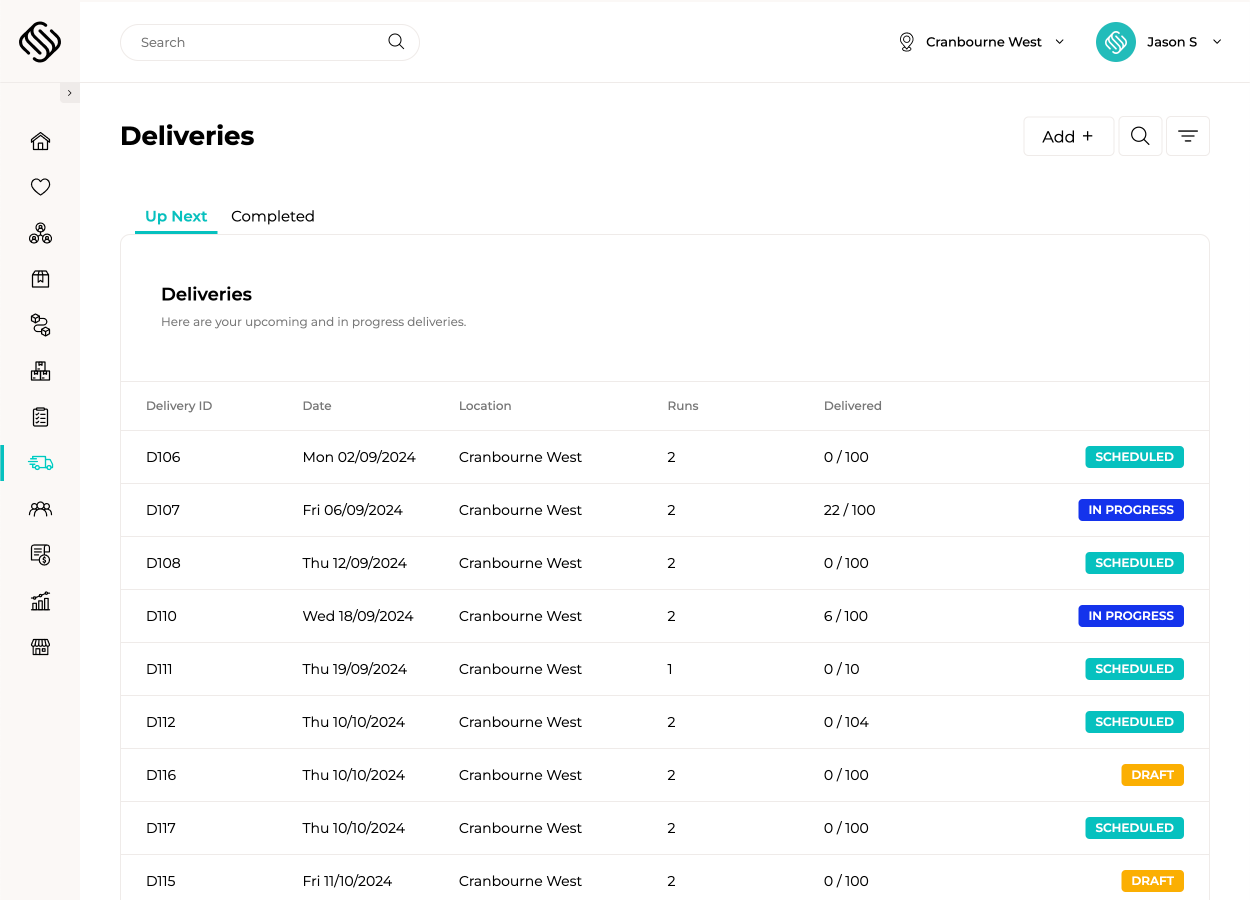
View case studyMove completed orders from warehouse dispatch through routing, delivery and proof of delivery without rebuilding information across separate systems. Supply’d keeps customers, cartons, vehicles, drivers and delivery requirements connected throughout the run.
Group orders into delivery runs using dates, zones, customer locations, delivery windows and your own operational rules. Set vehicle start and end locations, assign regular drivers and include custom stops such as supplier collections, vehicle requirements or other tasks that are not linked to a customer order. Supply’d also supports delivery-window overrides where your own agreed schedule differs from connected customer settings.
 Powered by Supply'd Intelligence
Automatically build efficient routes across one or multiple vehicles using Supply’d Intelligence. Supply’d considers vehicle capacity, delivery windows, traffic, travel time, expected stop durations, driver breaks and customer opening hours, helping your team complete more deliveries with less manual planning. The routing engine can use packed order dimensions when considering vehicle capacity, while expected stop times improve using information from previous delivery runs.
Give drivers their delivery sequence, customer details, order information, navigation and stop instructions on a supported mobile device. Drivers can see what has been completed, what is next and any customer-specific requirements throughout the run.

Use barcoded shipping labels and supported scanners to confirm cartons as they leave the warehouse and again when they reach the customer. Supply’d keeps each carton connected with the correct order and delivery, reducing missed parcels, incorrect drop-offs and uncertainty over what was actually supplied.
Require drivers to complete the checks relevant to each vehicle, customer or delivery before the stop can be finished. Refrigerated and frozen vehicles can trigger temperature recording at delivery, while custom fields can capture condition checks, return quantities, notes or other information your operation requires.

Record the recipient’s name, signature, photos, location and delivery time directly from the driver’s device. Proof of delivery is immediately connected with the customer and order, giving your team a clear record when responding to delivery questions or disputes.
Send automatic email or SMS updates when an order is on its way or has been delivered. Customers receive timely information and proof of delivery while your team spends less time answering delivery-status calls.

Use Supply’d for deliveries completed by your own drivers while keeping third-party freight connected through supported platforms such as Shippit and Starshipit. Generate shipping labels, pass order details to the carrier and maintain one fulfilment workflow regardless of how each order reaches the customer.

Explore how food manufacturers, bakeries, wholesalers and retailers use Supply’d ERP to run their operations.
Book a demoSupply’d ERP is built around the workflows food manufacturers, distributors and retailers rely on every day.
Supply’d is built around the way food and retail businesses actually operate. We combine deep industry understanding with connected technology to deliver delivery management software that improves control, reduces manual work and connects teams across the operation.
Delivery management software helps businesses plan delivery runs, optimise routes, manage drivers, track delivery progress and capture proof of delivery. Supply'd connects these workflows with sales orders, warehouse fulfilment, customers and reporting.
Yes. Supply'd is built for food manufacturers, wholesalers, distributors, retailers, bakeries and hospitality groups managing their own delivery fleet, external freight or a combination of both.
Yes. Orders that require delivery can flow from fulfilment into delivery planning without being recreated manually. Customer details, delivery addresses, cartons, instructions and delivery requirements remain connected.
Yes. Orders can be grouped into delivery runs using delivery dates, locations, zones, customer requirements and other operational rules.
Yes. Delivery orders can be distributed across multiple vehicles, with routes planned around vehicle capacity, delivery windows, travel time and other operational requirements.
Yes. Vehicle capacity can be configured so route planning considers how much each vehicle can carry. Packed order dimensions and other capacity information may also be used where available.
Yes. Drivers and vehicles can be assigned to delivery runs so each person receives the relevant sequence, customer details, instructions and delivery tasks.
Yes. Routes can be planned with different vehicle start and end locations, supporting operations where vehicles leave from or return to different depots, warehouses or sites.
Yes. Customers and locations can be organised into delivery zones or service areas to help structure run planning, delivery schedules and operational responsibilities.
Yes. Delivery windows can be connected with customers or locations so route planning considers when each order can be delivered.
Yes. Delivery-window overrides can be used when your agreed operating schedule differs from the customer's normal or connected delivery settings.
Yes. Custom route stops can be added for supplier collections, warehouse visits, vehicle requirements, staff tasks or other operational activities that need to occur during a run.
Route optimisation uses delivery locations, vehicle information, delivery windows, travel time and other constraints to recommend an efficient sequence of stops across one or more vehicles.
Yes. Supply'd Intelligence can automatically plan delivery routes across one or multiple vehicles using the orders, locations and operating constraints assigned to the run.
Route planning can consider expected travel time and traffic conditions when determining the recommended delivery sequence.
Yes. Customer delivery windows can be included when routes are generated, helping reduce deliveries being scheduled before or after the customer can receive them.
Yes. Customer opening hours and delivery availability can be used as route-planning constraints where they are maintained within the delivery workflow.
Yes. Driver breaks can be included when planning delivery runs so routes reflect the time required for rest periods and other scheduled interruptions.
Expected stop durations can use previous delivery information to improve route planning over time, helping the schedule better reflect how long different customer deliveries typically require.
Yes. Recommended routes can be reviewed and adjusted before they are assigned or started, allowing your team to account for operational knowledge or last-minute changes.
Yes. Drivers can use supported mobile devices or PDA scanners to access their delivery sequence, customer details, order information and stop instructions.
Yes. Delivery stops can provide address and navigation information so drivers can move through their assigned run without manually searching for each destination.
Yes. Access instructions, receiving requirements, preferred drop-off locations, contact details and other customer-specific information can remain connected with the delivery stop.
Yes. Drivers can see completed and outstanding stops throughout the run, while authorised office staff can maintain visibility over run progress.
Supply'd provides live delivery-run progress and completed-stop visibility. The exact location and tracking information available depends on the device, workflow and integration used.
Yes. Barcoded cartons can be scanned during dispatch and delivery using supported mobile devices, helping confirm that the correct packages are loaded and supplied to the correct customer.
Yes. Cartons can remain connected with the relevant customer order and delivery, giving your team clearer visibility over what was packed, dispatched and delivered.
Yes. Dispatch teams can scan cartons as they are loaded or handed over, helping confirm that the correct packages have been assigned to the correct delivery run.
Yes. Drivers can scan cartons at the delivery location to confirm which packages were handed over and identify missing or incorrect cartons before the stop is completed.
Supply'd supports carton and logistics labelling workflows, including supported SSCC and barcode formats where required by the operation or customer.
Yes. Temperature recording can be required for refrigerated, frozen or other temperature-controlled delivery workflows before a stop is completed.
Yes. Delivery checks can be configured so drivers must record the required temperature or other information before completing the delivery.
Yes. Checks can be configured around the vehicle, customer, delivery type or other operating requirements, allowing refrigerated and ambient deliveries to follow different processes.
Yes. Custom fields can be used to capture information such as condition checks, return quantities, pallet counts, temperatures, notes or other records required by the business.
Digital proof of delivery creates an electronic record showing when and how an order was delivered. This may include the recipient's name, signature, photos, delivery time and location information.
Yes. Drivers can capture the recipient's signature on a supported device and connect it directly with the customer, order and delivery record.
Yes. The recipient's name can be recorded alongside the signature, delivery time and other proof-of-delivery information.
Yes. Drivers can attach photos to the delivery record, helping document where products were left, the condition of the order or other relevant delivery details.
Yes. Delivery completion time can be recorded automatically as part of the proof-of-delivery record.
Location information can be captured as part of the delivery workflow, depending on the supported device and permissions available.
Yes. Authorised team members can access proof-of-delivery information when responding to customer questions, delivery disputes or internal reviews.
Yes. Proof-of-delivery information can be included in supported customer communications or made available to authorised users after the delivery is completed.
Yes. Supply'd can send supported email or SMS notifications as orders move through delivery, helping customers understand when an order is on its way or has been delivered.
Yes. Customers can receive an automated notification with a specified delivery window when the delivery run is commenced.
Yes. Delivery-complete notifications can be sent with relevant order or proof-of-delivery information according to your communication workflow.
Communication preferences and contact details can be configured around the customer or location so notifications are sent to the appropriate recipient.
Yes. Orders delivered by your own fleet can be managed alongside orders sent through supported external freight platforms, maintaining one connected fulfilment workflow.
Yes. Supply'd supports integration with Shippit so order and shipping information can flow into supported freight-booking and labelling workflows.
Yes. Supply'd supports integration with Starshipit for connected freight booking, shipping labels and fulfilment workflows.
Yes. Shipping labels can be generated through supported freight integrations using the customer and order information already held in Supply'd.
Yes. Delivery methods can be managed according to the customer, order, location or operational requirement, allowing internal fleet and external freight workflows to run together.
Yes. Delivery dates, runs and carton information can remain connected with warehouse picking, packing and dispatch workflows so orders are prepared for the correct vehicle or carrier.
Yes. Supply'd can report on delivery runs, completed stops, delivery timing, proof of delivery, checks, returns and other connected delivery information.
Yes. Authorised users can see which stops are planned, in progress, completed or still requiring attention across current delivery runs.
Yes. Permissions can be configured so drivers, dispatch teams, customer service staff and managers only see and complete the delivery actions relevant to their roles.
Drivers can use supported mobile devices and PDA scanners to access delivery runs, navigate stops, scan cartons, complete checks and capture proof of delivery.
Yes. Supply'd is designed for food businesses managing multiple vehicles, delivery windows, temperature checks, carton scanning, proof of delivery, customer notifications and a mixture of internal fleet and external freight.