Most systems manage individual parts of the operation. Supply’d connects the entire journey, bringing sales, forecasting, purchasing, production, inventory, picking and delivery together in one platform. From the moment an order is received, every team can see what needs to happen next.


Keep products, customers, suppliers and commercial information accurate across the business, so every team works from the same operational foundation.
Turn demand into coordinated purchasing, production, warehousing and delivery workflows without relying on disconnected systems or manual handovers.
Give teams real-time visibility over sales, inventory, margins, production and operational performance, with intelligence built into everyday work.
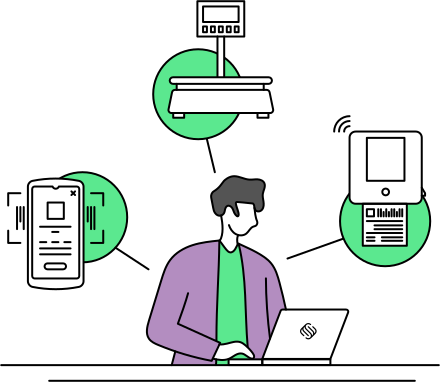
Supply'd ERP is more than just software; it’s a comprehensive solution with integrated hardware, including PDA scanners, scales, label printers, and more, designed to enhance your efficiency and streamline your workflow, helping you achieve more in less time.

Implementation is tailored to the size and complexity of your operation. Choose structured remote onboarding or deeper planning, data support, onsite training and go-live assistance through our Discovery & Implementation Program.
Explore Implementation
Supply’d is designed for food businesses that have outgrown basic inventory and order management but do not want the complexity of a traditional enterprise ERP deployment. It brings the operational depth required for production, warehouse, delivery and quality into one food-specific system that can expand as products, locations, channels and teams grow.
Connect Supply’d ERP with your accounting, ecommerce, ordering, shipping and operational systems, so information moves between platforms without creating more manual work.










Supply’d ERP connects beyond your own operation through Supply’d Hub and Supply’d Lite. Suppliers can share products, ranging requests and promotions through Hub, while customers can place connected orders through Lite. The result is less manual entry and a clearer flow of information across the wider supply chain.
The operating system your business runs on.
A simple, free ordering experience for customers buying from Supply’d ERP businesses.
HubA free supplier portal for maintaining product information and promotions with Supply’d ERP customers.

Explore how food manufacturers, bakeries, wholesalers and retailers use Supply’d ERP to run their operations.
Book a demoSupply'd ERP is connected business management software built for growing food manufacturers, wholesalers, distributors and retailers. It brings products, sales, purchasing, inventory, warehouse, production, delivery, quality and reporting together in one platform.
ERP stands for enterprise resource planning. ERP software connects the information and workflows used across different areas of a business instead of managing each area through separate systems and spreadsheets.
Yes. Supply'd ERP is designed around food-industry requirements such as batches, expiry dates, recipes, production, connected scales, warehouse scanning, delivery checks, food-safety records and product recalls.
Supply'd ERP is suitable for food manufacturers, bakeries, butchers, wholesalers, distributors, grocery businesses, wholefood stores, food retailers, central kitchens and larger multi-site hospitality operations.
Yes. Supply'd ERP is a cloud-based platform accessed through a supported web browser and compatible operational devices.
No traditional desktop installation is required for the main Supply'd ERP platform. Connected scanners, scales, printers and integrations may require their own setup.
Supply'd ERP manages product information, customers, sales orders, purchasing, supplier invoices, inventory, warehouse operations, production, delivery, quality records, training, reporting and intelligent planning workflows.
Yes. Supply'd ERP is designed to replace or reduce reliance on separate inventory, production, warehouse, delivery, quality and reporting tools by connecting those workflows within one platform.
Yes. Supply'd ERP can replace spreadsheets used for product data, purchasing, stock, production, batch records, delivery planning and reporting with connected operational workflows.
Yes. Supply'd ERP is designed for businesses that need more than basic stock and order management, particularly when production, warehouse scanning, delivery, quality, traceability or multi-site operations become important.
Supply'd ERP provides connected ERP capability focused specifically on food operations. Food-industry workflows are built into the platform, reducing the amount of custom configuration commonly required when deploying a broad traditional ERP.
Yes. Supply'd ERP centralises product details, pricing, suppliers, customers, recipes, allergens, nutrition, barcodes, labels and other operational information within a connected product record.
Yes. Supply'd ERP can maintain pricing for individual customers, customer groups, locations and sales channels according to the pricing structures configured for the business.
Yes. Supply'd ERP can maintain customer records, contacts, locations, pricing, payment terms, assigned sales representatives, leads and related sales activity.
Yes. Supply'd ERP brings wholesale, retail, ecommerce, point-of-sale, connected customer and internally entered sales orders into one management workflow.
Yes. Supported ecommerce, point-of-sale, B2B ordering and internal sales channels can feed orders into Supply'd ERP for connected fulfilment and reporting.
Yes. The Smart Order Inbox within Supply'd ERP can read supported customer purchase order documents and prepare sales orders for human review.
Yes. Supply'd ERP manages supplier products, pricing, terms, purchase orders, receiving, supplier invoices, purchasing recommendations and connected accounting workflows.
Yes. Smart Purchasing within Supply'd ERP can consider current inventory, expected demand, incoming stock, supplier lead times, minimum stock requirements, supplier minimums and ordering multiples to recommend what should be purchased.
Yes. Supported supplier invoices can be uploaded or emailed into Supply'd ERP for extraction, purchase-order matching and discrepancy review.
Yes. Supply'd ERP can compare purchase-order quantities and prices with goods received and supplier invoice information, helping identify discrepancies before approval.
Yes. Supply'd ERP can highlight differences between expected purchase pricing and the amounts charged on supported supplier invoices.
Yes. Freight, duties and other landed costs can be allocated across received products using the connected purchasing and invoice information held within Supply'd ERP.
Yes. Supply'd ERP can manage inventory across warehouses, stores, production areas and other stock locations with connected transfers and reporting.
Yes. Supply'd ERP tracks supplier and finished-product batches with production, expiry and best-before information throughout receiving, inventory, production, fulfilment and delivery.
Yes. Batch and expiry reporting within Supply'd ERP can identify short-dated and expired inventory across products, batches and locations.
Yes. Supply'd ERP can manage stock transfers between warehouses, stores, production areas and other maintained inventory locations.
Yes. Supply'd ERP can record damaged, expired, contaminated or otherwise unusable stock against the relevant product, batch, location, quantity and write-off reason.
Yes. Supply'd ERP includes receiving, stock movements, bin management, stocktakes, picking, packing, carton scanning and dispatch workflows.
Yes. Supported PDA and barcode scanners can be used with Supply'd ERP for receiving, stock movement, stocktakes, picking, packing, batch selection and dispatch workflows.
Yes. Batch and expiry information within Supply'd ERP can support first-in, first-out and expiry-aware stock selection workflows where configured.
Yes. Supply'd ERP can maintain warehouse bins and stock locations so products can be received, moved, counted, picked and replenished within the correct storage area.
Yes. Supply'd ERP supports full and targeted stocktakes using supported computers, mobile devices and barcode scanners.
Yes. Supply'd ERP supports guided picking, batch selection, carton allocation, packing, barcode validation and dispatch workflows.
Yes. Supply'd ERP includes recipes, sub-recipes, multi-stage production, guided ingredient weigh-up, labour capture, yield tracking, product breakdowns, batch costing and traceability.
Yes. Recipes in Supply'd ERP can include ingredients, packaging, labour, overheads and sub-recipes or intermediate products used within later production stages.
Yes. Supply'd ERP can manage multiple production stages such as preparation, mixing, cooking, cooling, cutting, packing and quality checks.
Yes. Supply'd ERP supports connected production workflows using compatible Wedderburn scales and food-safe touch screens.
Guided weigh-up in Supply'd ERP steps production staff through each required ingredient and uses a connected scale to confirm that the correct quantity is within tolerance before the workflow continues.
Yes. Supply'd ERP presents each ingredient as part of a controlled sequence and requires the relevant weigh-up step to be completed before production continues.
Yes. Production runs in Supply'd ERP can record actual ingredient usage, labour, finished quantities and yield for comparison with expected recipe and production results.
Yes. Supply'd ERP can combine ingredient, packaging, labour and configured overhead costs to calculate expected and actual production costs.
Yes. Supply'd ERP can record one input being broken into multiple finished products, by-products and waste using supported connected scale workflows.
Yes. Approved ingredient substitutions can be selected and recorded against the relevant production run, with the actual product and quantity used retained against the finished batch.
Yes. Smart Production Planning within Supply'd ERP can combine customer orders, delivery dates, current stock, minimum stock requirements and forecast demand to recommend what should be produced.
Yes. Supply'd ERP includes delivery-run planning, route optimisation, driver workflows, carton scanning, delivery checks, customer notifications and digital proof of delivery.
Yes. Supply'd Intelligence within Supply'd ERP can optimise routes across one or multiple vehicles using delivery locations, windows, capacity, travel time, stop duration, opening hours and driver breaks.
Yes. Drivers can use supported mobile devices to access Supply'd ERP delivery runs, navigation, customer information, carton scanning, delivery checks and proof-of-delivery workflows.
Yes. Supply'd ERP can use supported mobile devices or PDA scanners to confirm cartons during dispatch and again when they are delivered to the customer.
Yes. Supply'd ERP can record recipient names, signatures, photographs, delivery times and supported location information against the completed delivery.
Yes. Supply'd ERP delivery workflows can require temperature and other relevant checks before a stop is completed.
Yes. Supply'd ERP can send supported email or SMS notifications when an order is on its way or has been delivered.
Yes. Supply'd ERP can manage internal fleet deliveries alongside supported external freight workflows through integrations such as Shippit and Starshipit.
Yes. Supply'd ERP keeps quality information within the operational workflow it belongs to, including receiving checks, production fields, batch documents, inventory write-offs, recurring tasks, training and recalls.
Yes. Cleaning schedules, opening checks, closing checks, equipment inspections and other recurring records can be completed as digital tasks within Supply'd ERP.
Yes. Supply'd ERP can record receiving checks such as temperature, product condition, quantity and acceptance information before stock enters inventory.
Yes. Configurable production fields in Supply'd ERP can capture cooking temperatures, cooling temperatures, metal detection results, weights, seal checks, pass-or-fail outcomes and other required information.
Yes. Supply'd ERP can store certificates of analysis and supporting documents against the relevant supplier or finished-product batch.
Yes. Businesses can create courses and topics, upload training videos, assign participants and track progress and completion within Supply'd ERP. Preloaded Supply'd system training also supports onboarding.
Yes. Supply'd ERP records which user completed each supported task or check, when it was completed and the information recorded as part of the workflow.
Yes. Supply'd ERP can trace an affected ingredient, product or batch through receiving, production, transfers, inventory and customer orders to identify impacted stock and recipients.
Yes. Supply'd ERP connects ingredient batches with the production runs and finished-product batches in which they were used.
Yes. Supply'd ERP can trace finished batches through inventory, fulfilment and sales orders to identify customers and locations that received affected stock.
Yes. Supply'd ERP includes reporting across sales, margins, customers, products, inventory, expiry risk, write-offs, production costs, yields and other operational information.
Yes. Supported Supply'd ERP reports can compare a selected period across up to 24 previous periods to identify trends, growth, seasonality and unusual movements.
Yes. Supported reports can be filtered and grouped by relevant dimensions such as product, category, customer, customer group, location, salesperson, sales channel and order source.
Yes. Supply'd ERP report configurations can be saved and scheduled for automatic email delivery at supported intervals.
Yes. Supported Supply'd ERP reports can be exported to CSV for further analysis, stakeholder reporting or use in external tools.
Yes. Supply'd ERP supports trend-based forecasting using moving averages and AI-powered forecasting that can consider factors such as weather, seasonality, public holidays and school holidays.
Yes. Supply'd ERP can compare current inventory with historical or forecast usage to estimate stock coverage in days, weeks or months.
Yes. Supply'd ERP can compare expected and actual ingredient usage, labour, finished output, production cost and yield.
Supply'd Intelligence is embedded automation and forecasting within Supply'd ERP. It supports document capture, demand forecasting, Smart Purchasing, production planning and delivery route optimisation.
Most Supply'd Intelligence workflows are initiated by a user and follow a human-in-the-loop approach. Supply'd Intelligence prepares recommendations or draft records for review before the workflow continues.
Human in the loop means users remain involved in initiating, reviewing and continuing intelligent workflows. Supply'd Intelligence prepares a recommendation or draft result, while the user reviews and adjusts it before proceeding.
Yes. Supply'd Intelligence uses relevant operational information held within Supply'd ERP, such as orders, inventory, suppliers, products, production requirements and delivery constraints.
Supply'd Lite is a free purchasing platform that customers can use to order from suppliers. Orders from connected Lite customers can flow into the supplier's Supply'd ERP sales-order workflow.
Supply'd Hub is a supplier-facing catalogue and ranging platform. Suppliers can connect with retailers using Supply'd ERP, submit products for ranging, share promotions and view connected sales orders.
Customers can use Supply'd Lite to browse connected products and place orders, which can then flow into the supplier's Supply'd ERP sales-order workflow.
Supply'd Hub allows suppliers to share catalogue information, ranging requests and promotions with retailers using Supply'd ERP.
Yes. Supply'd ERP supports connected workflows with accounting platforms including Xero and MYOB, depending on the requirements and integration enabled for the account.
Yes. Supply'd ERP supports integrations with platforms such as Shopify and WooCommerce for connected product, customer and order workflows.
Yes. Supported Supply'd ERP point-of-sale integrations include platforms such as Square and compatible partner systems.
Yes. Supply'd ERP supports connected external freight workflows through platforms such as Shippit and Starshipit.
Yes. Supply'd ERP supports connected ordering workflows with selected B2B and industry platforms, depending on the integrations enabled for the account.
Yes. Supply'd ERP supports compatible PDA scanners, barcode scanners, Wedderburn scales and label printers across warehouse, production and delivery workflows.
Yes. Supply'd ERP can manage products, inventory, orders, production and reporting across multiple warehouses, stores, factories and other operating locations.
Yes. Supply'd ERP can connect supported wholesale, retail, ecommerce, point-of-sale and internal sales channels within one operational platform.
Yes. Supply'd ERP permissions can be configured so employees access the areas and actions relevant to their responsibilities.
Supply'd ERP implementation generally includes system configuration, data preparation, user setup, training and rollout support. Larger or more complex deployments can include discovery, onsite implementation and structured go-live assistance.
Yes. Supply'd provides structured data templates and can provide data assistance depending on the implementation package and agreed scope.
Yes. Supply'd ERP training can include preloaded Supply'd courses, remote sessions, role-based training and onsite implementation support depending on the deployment.
Yes. Larger and more complex Supply'd ERP projects can include onsite discovery, setup, training, hardware support, testing and go-live assistance.
Supply'd ERP implementation time depends on the number of locations, data quality, integrations, hardware, operational complexity and the resources available from both teams. A rollout plan is developed around the agreed scope.
Yes. Supply'd ERP can be introduced through a phased rollout where operational requirements, integrations and internal resources make that approach more appropriate.
Yes. Supply'd provides ongoing support and implementation follow-up according to the service level and deployment package agreed for the customer.
Supply'd ERP is best suited to businesses with sufficient operational complexity to benefit from connected inventory, production, warehouse, delivery or quality workflows. Smaller businesses needing only supplier purchasing may be better suited to Supply'd Lite.
Yes. Supply'd ERP supports multi-site operations, high product volumes, complex purchasing, production, warehouse scanning, delivery and connected reporting for larger food businesses.
Yes. Businesses can expand their use of Supply'd ERP as product ranges, customers, suppliers, users, locations, sales channels and operational complexity grow.
Yes. Supply'd ERP supports recipes, production planning, connected scales, ingredient usage, labour, yield, costing, warehouse operations, traceability and delivery for food manufacturers.
Yes. Supply'd ERP supports customer pricing, sales orders, purchasing, inventory, warehouse scanning, delivery management and reporting for food wholesalers and distributors.
Yes. Supply'd ERP supports product information, purchasing, inventory, point-of-sale and ecommerce integrations, multi-location stock, production and reporting for food retailers.
Yes. Supply'd ERP supports recipes, sub-recipes, guided ingredient weigh-up, production planning, wholesale orders, retail integrations, batches, costing and delivery for bakery operations.
Yes. Supply'd ERP supports batches, connected scales, production, product breakdowns, multiple outputs, waste, yield, costing, warehouse operations and traceability for butchers and meat processors.
Yes. Supply'd ERP can manage central production, recipes, ingredients, transfers, inventory, quality records and supply across multiple venues or operating locations.
Book a demonstration with the Supply'd team to review your current operation, key requirements and how Supply'd ERP could support your products, orders, inventory, production and fulfilment workflows.