






Madhouse Bakehouse
All-Australian wholesale bakery.
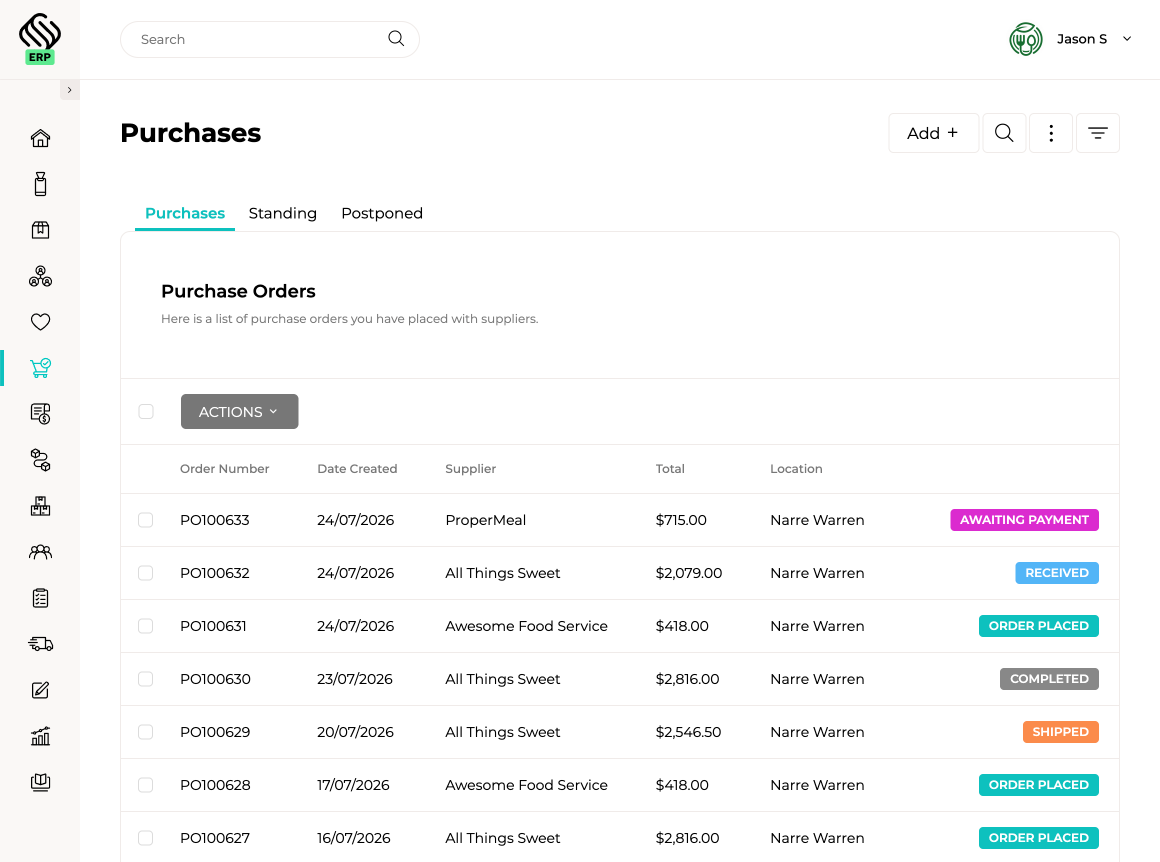
View case studyManage purchasing from demand planning through to supplier ordering, receiving and invoice reconciliation. Supply’d keeps supplier pricing, stock levels, production requirements, incoming orders and purchasing rules connected throughout the process.
 Powered by Supply'd Intelligence
Smart Purchasing brings together sales demand, production requirements, current inventory, incoming stock and minimum hold levels to recommend what should be ordered. Supply’d can also check whether stock is available at another location before raising a new supplier order, helping reduce unnecessary purchasing and excess inventory.
Keep supplier contacts, products, pricing, carton quantities, lead times, minimum orders and quantity multiples together in one connected supplier record. Manage multiple suppliers against the same product, compare purchasing options and retain a clear history of supplier costs and ordering requirements.
 Connected Through Supply'd Hub
See active and upcoming supplier promotions while reviewing products, building purchase orders or using Smart Purchasing. Promotional pricing can be applied automatically to purchase orders, helping your team identify buying opportunities and protect margins before the order is sent. Suppliers can also submit promotions through Supply’d Hub, reducing the chance that valuable offers disappear into the daily landfill of supplier emails.
Explore Supply'd HubSet up standing purchase orders for products you buy on a regular schedule. Supply’d can automatically create each order weekly, fortnightly, monthly or at another chosen frequency, with the option to review and adjust quantities before it is sent.
| Description | Qty | Amount |

|
||

|
||
|
|
||
|
|
||
|
|
||
Powered by Supply'd Intelligence
Suppliers send invoices directly to your Supply’d invoice inbox. Supply’d Intelligence reads each invoice, matches it against the purchase order and received stock, highlights price or quantity differences, and calculates landed costs such as freight and duties. Once reviewed, supplier invoices can be approved and sent to supported accounting platforms such as Xero and MYOB, keeping purchasing, inventory costs and accounts connected without repeated data entry.

Explore how food manufacturers, bakeries, wholesalers and retailers use Supply’d ERP to run their operations.
Book a demoSupply’d ERP is built around the workflows food manufacturers, distributors and retailers rely on every day.
Supply’d is built around the way food and retail businesses actually operate. We combine deep industry understanding with connected technology to deliver order management software that improves control, reduces manual work and connects teams across the operation.
Purchasing and procurement software helps businesses manage suppliers, purchasing requirements, purchase orders, incoming stock, supplier invoices and costs in one connected workflow. Supply'd links purchasing with inventory, production, receiving and accounting.
Yes. Supplier contacts, products, pricing, lead times, carton quantities, minimum orders and purchasing rules remain connected with purchase orders, receiving and supplier invoices.
Yes. Multiple suppliers can be connected to the same product, each with their own supplier SKU, price, purchase unit, carton quantity, lead time, minimum order and quantity multiple.
Yes. Supply'd can maintain pricing and purchasing information across multiple suppliers, helping your team compare available supply options and understand how supplier cost changes affect product margins.
Yes. Current and previous supplier pricing can remain connected with products, purchase orders and supplier invoices, giving your team clearer visibility over cost changes over time.
Yes. Lead times can be recorded against supplier products and used when planning purchasing requirements and expected delivery dates.
Yes. Supplier minimum order values, carton quantities and quantity multiples can be applied when purchase orders are created, helping your team order in quantities the supplier can fulfil.
Smart Purchasing brings together sales demand, production requirements, current inventory, incoming stock and minimum hold levels to recommend what should be purchased.
Yes. Supply'd can use demand, inventory, production requirements and purchasing rules to recommend which products should be ordered and in what quantities.
Yes. Ingredient and packaging requirements generated from production planning can feed into Smart Purchasing, helping buyers understand what must be ordered to support upcoming production.
Yes. Supply'd can help teams understand whether required stock is available at another location before a new supplier order is created, reducing unnecessary purchasing and excess inventory.
Yes. Recommended quantities can be reviewed, adjusted and converted into purchase orders using the supplier products, pricing and ordering rules already held in Supply'd.
Yes. Your team can create purchase orders directly when purchasing outside the normal recommendation workflow or when responding to an immediate operational requirement.
Yes. Purchase orders can be created or updated from supported computers, tablets and mobile scanning devices, allowing staff to work from the warehouse, storeroom or shop floor.
Yes. Completed purchase orders can be generated and sent to suppliers using the supplier contact information and ordering details held in Supply'd.
Purchasing permissions and review processes can be configured so purchase orders are checked by the appropriate team members before they are sent to suppliers.
Yes. Supplier promotions can be recorded with eligible products, promotional costs and active dates. Promotions can be shown during purchasing and automatically applied to purchase orders.
Yes. Suppliers can submit upcoming promotions through Supply'd Hub for review by businesses using Supply'd ERP, giving purchasing teams one place to see available buying opportunities.
Yes. Active and upcoming promotions can be shown while reviewing products, building purchase orders and using Smart Purchasing, helping buyers make more informed purchasing decisions.
Yes. Standing purchase orders can be scheduled for products purchased on a regular basis, including weekly, fortnightly, monthly or other recurring schedules.
Yes. Automatically created purchase orders can be reviewed and adjusted before they are sent to the supplier, allowing regular purchasing to remain flexible as requirements change.
Yes. Purchase orders can include expected delivery dates and status information, helping your team see what has been ordered, what is due and what remains outstanding.
Yes. Supply'd can show purchase orders that are open, partially received, overdue or completed, giving purchasing and warehouse teams a clearer view of incoming stock.
Yes. Products can be received against the original purchase order so your team can compare ordered and delivered quantities before inventory is updated.
Yes. Purchase orders can remain open when only part of the order has been delivered, allowing the outstanding quantities to be tracked until they arrive or are cancelled.
Yes. Receiving teams can record differences between what was ordered and what arrived, including shortages, excess quantities, substitutions and unexpected products.
Yes. Supplier batch numbers and expiry dates can be captured during receiving and followed through inventory, production, fulfilment and traceability workflows.
Yes. Supported scanners and mobile devices can be used to receive stock, scan barcodes, confirm quantities and capture batch and expiry information while products are being unloaded or stored.
Yes. Supplier invoices can be forwarded to a dedicated Supply'd inbox or uploaded directly for scanning and review.
Yes. Supply'd can read supported supplier invoices and identify information such as the supplier, products, quantities, pricing, tax and invoice totals, reducing manual data entry.
Yes. Information extracted from a supplier invoice can be used to create an expense ready for review, reconciliation and approval.
Yes. Supply'd can compare what was ordered, what was received and what the supplier charged, helping your team identify discrepancies before the expense is approved.
Yes. Differences between purchase order pricing and supplier invoice pricing can be highlighted for review, helping your team detect unexpected price changes or incorrect charges.
Yes. Supplier promotions can remain visible during expense reconciliation, helping accounts teams confirm that the supplier charged the agreed promotional price.
Yes. Freight, duties and other purchasing costs can be allocated across the products received, giving your team a more accurate landed cost for inventory valuation, product costing and margin reporting.
Yes. Additional purchasing costs can be distributed across products using the available allocation method, helping each product reflect its share of freight, duties and related charges.
Yes. Supplier invoice details, purchase orders, received quantities, pricing differences and landed costs can be reviewed before an expense is approved and sent to accounting.
Yes. Permissions can be configured so purchasing, receiving, accounts and management teams can access and approve the information relevant to their roles.
Yes. Supply'd integrates with supported accounting platforms including Xero and MYOB. Approved supplier and expense information can flow into the accounting workflow according to the integration and implementation scope.
Supply'd is designed to manage the operational purchasing workflow, including suppliers, purchase orders, receiving, invoice reconciliation and landed costs. Approved financial information can then be sent to supported accounting platforms.
Yes. Supply'd can support purchasing, stock requirements, receiving and supplier information across multiple locations, warehouses, production sites and departments within one connected platform.
Yes. Purchasing requirements from multiple locations can be reviewed centrally while still retaining the inventory, delivery and operational requirements of each individual site.
Yes. Supplier availability, pricing and purchasing rules can be configured around the products and locations relevant to your operation.
Yes. Supply'd can report on purchasing activity, supplier costs, product pricing, outstanding orders, delivery differences and other connected purchasing information.
Yes. Supply'd is designed for food businesses managing multiple suppliers, large product catalogues, production requirements, multiple locations, supplier promotions, recurring orders, batch receiving and invoice reconciliation.