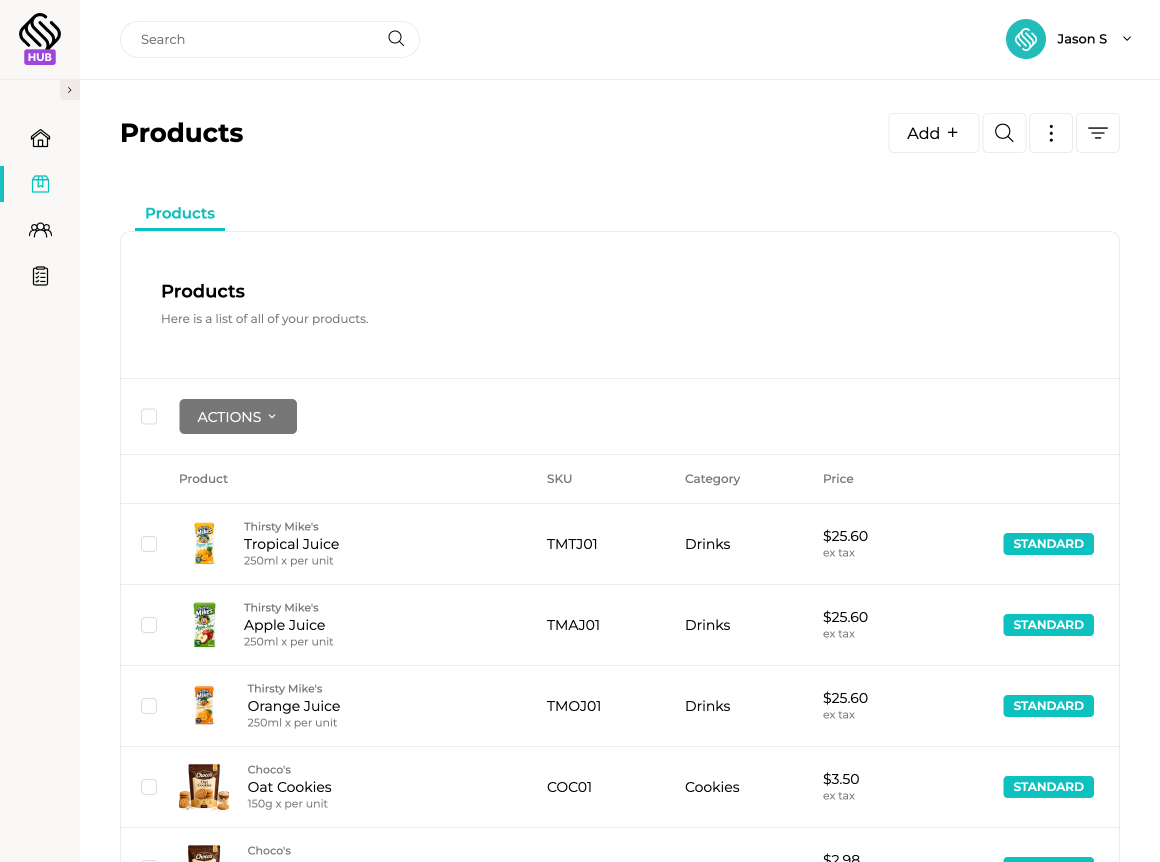
Bring your catalogue, retailer connections, ranging requests, promotions and incoming sales orders together in one platform. Supply’d Hub helps your team manage the journey from product submission to repeat ordering without relying on disconnected emails, spreadsheets and catalogue files.
Add and maintain the product information retailers need to review and order your range. Keep product details, images, pricing and ordering information together in one catalogue that can be shared with connected retailers.
Connect with retailers already managing their operations through Supply’d ERP. Once connected, retailers can review the catalogue information you share, assess products for ranging and order accepted products through their existing Supply’d workflow.

Select products from your catalogue and submit them directly to connected retailers for consideration. Retailers receive the request within Supply’d, where they can review the product information and accept or decline each item.
See which products have been submitted to each retailer and whether each request has been accepted or declined. Your team gets one clear record of ranging activity without chasing email threads or maintaining separate customer spreadsheets.
Create promotions for selected products and make them visible to connected retailers while they are preparing orders. Showing offers at the point of purchase helps increase awareness and improves the likelihood that retailers include promoted products in their order.
View sales orders received from connected retailers through Supply’d. Each order includes the relevant customer, products and quantities, giving your team a clearer view of incoming demand without relying on manually interpreted emails or spreadsheets.

Create your free Supply’d Hub account, add your catalogue and start connecting with retailers using Supply’d.
Join Supply'd HubSupply'd Hub is a product catalogue, ranging and connected ordering platform designed for food suppliers. It helps suppliers share products with retailers using Supply'd, submit items for ranging, publish promotions and view incoming sales orders.
Supply'd Hub is designed for food manufacturers, wholesalers, distributors, brands and other suppliers that sell products to retailers using Supply'd ERP.
Supply'd Hub is primarily designed for suppliers. Retailers using Supply'd ERP review supplier connections, assess ranging requests and order accepted products through their existing Supply'd workflows.
Yes. Suppliers can register for a free Supply'd Hub account to add their catalogue, connect with participating retailers and use the available Hub workflows.
No. Suppliers can use Supply'd Hub without subscribing to Supply'd ERP.
No. Supply'd Hub focuses on product catalogues, retailer connections, ranging, promotions and sales-order visibility. Businesses requiring inventory, production, warehouse, purchasing, delivery and broader operational management may be better suited to Supply'd ERP.
Yes. Suppliers can add and maintain products in a catalogue that can be shared with connected retailers.
Suppliers can add the supported product, image, pricing and ordering information required for retailers to review and order their range.
Yes. Product images can be added to help retailers identify and assess items within the supplier catalogue.
Yes. Supported pricing and ordering information can be maintained and shared with connected retailers.
Yes. Suppliers can maintain their catalogue as products, pricing and ordering information change.
Updated information shared through Supply'd Hub can be made available to connected retailers through their Supply'd workflow.
Suppliers can maintain which products remain available within their Hub catalogue, subject to the product controls provided by the platform.
Supply'd Hub can reduce reliance on separate spreadsheets, PDFs and email attachments by keeping product information in one connected catalogue.
Yes. Suppliers can connect with participating retailers that use Supply'd ERP.
Once connected, the supplier can share supported catalogue information, submit products for ranging and make promotions available to the retailer.
Yes. A supplier can manage connections with multiple participating retailers through Supply'd Hub.
Connected retailers can review the catalogue information the supplier shares with them through Supply'd.
Supply'd Hub supports connections with participating retailers. It should not be treated as an unrestricted public directory of every business using Supply'd.
Product ranging is the process a retailer uses to review and decide whether a supplier's product should be added to its approved product range.
Yes. Suppliers can select products from their catalogue and submit them to connected retailers for consideration.
The retailer receives the request within Supply'd, where authorised users can review the submitted product information.
Yes. The retailer can accept a submitted product when it decides to include that item within its range.
Yes. The retailer can decline products it does not wish to range.
Yes. Suppliers can see the available outcome of product-ranging requests submitted to connected retailers.
Suppliers can submit products from their catalogue for retailer review using the supported ranging workflow.
Yes. A catalogue product can be submitted to relevant connected retailers independently.
Yes. Supply'd Hub keeps ranging activity connected with the relevant retailer and submitted products.
Supply'd Hub provides a record of submitted ranging requests and their available outcomes, helping suppliers avoid maintaining separate ranging spreadsheets.
No. Retailers remain responsible for reviewing each request and deciding whether to accept or decline the product.
Accepted products can become available within the retailer's connected Supply'd ordering workflow, subject to the retailer and supplier relationship.
Yes. Suppliers can create promotions for selected products and make them available to connected retailers.
Promotions can be shown to connected retailers while they are preparing orders through Supply'd.
Showing promotions at the point of purchase gives buyers relevant information while they are deciding which products and quantities to order.
Making promotions visible within the ordering workflow can improve awareness and increase the likelihood that retailers include promoted products in their orders.
Yes. Promotions can be created for selected products using the promotion settings supported by Supply'd Hub.
Yes. Promotions can be shared with connected retailers through their Supply'd ordering workflow.
Supply'd Hub can reduce reliance on promotional emails by placing offers directly within the ordering process. Suppliers may still use other communication channels alongside Hub.
Yes. Suppliers can view sales orders received from connected retailers through Supply'd.
Sales orders include the supported customer, product, quantity and ordering information provided through the connected retailer workflow.
Yes. Incoming orders remain connected with the retailer that submitted them.
Yes. Suppliers can view the products and quantities included in connected sales orders.
Yes. Retailers using Supply'd ERP can order accepted supplier products through their existing purchasing workflow.
Connected orders can reduce reliance on orders received through spreadsheets, emails or other formats that require manual interpretation and entry.
Supply'd Hub provides visibility of connected sales orders. Full warehouse, inventory, fulfilment and delivery workflows require Supply'd ERP or the supplier's existing operational systems.
The available order actions depend on the current Hub workflow. Suppliers should not treat Hub as a complete order fulfilment system unless those capabilities are specifically enabled.
Integration or export options depend on the workflows currently available for the supplier account. Supply'd Hub is primarily designed to provide connected catalogue, ranging, promotion and order visibility.
Yes. Hub gives suppliers a more organised way to share products, manage ranging activity, promote accepted items and receive connected retailer orders.
Supply'd Hub can reduce the need for separate ranging spreadsheets by keeping submitted products and retailer outcomes connected in one platform.
Hub can reduce reliance on emailed catalogues by allowing suppliers to maintain shared product information directly within the platform.
Yes. Suppliers can manage connections and activity across multiple participating retailers.
Yes. Ranging decisions are managed independently by each retailer, so the products accepted by one customer may differ from those accepted by another.
Yes. Suppliers can maintain their products in Supply'd Hub and use that catalogue when connecting and submitting products to relevant retailers.
Yes. Supply'd Hub is cloud-based and can be accessed through a supported web browser.
No traditional desktop installation is required. Supply'd Hub runs through a supported web browser.
Team access depends on the user and permission options available within the Hub account. Authorised users can work with the relevant supplier catalogue and retailer activity.
Yes. Food manufacturers can use Hub to share their product catalogue, submit items to retailers for ranging, publish promotions and view connected orders.
Yes. Wholesalers and distributors supplying retailers can use Hub to manage shared product information, ranging and connected retailer orders.
Yes. Emerging brands can use Hub to present products consistently and manage ranging activity with participating retailers using Supply'd.
Supply'd Hub is designed for suppliers sharing products and receiving retailer orders. Supply'd Lite is designed for buyers creating and sending purchase orders to their suppliers.
Supply'd Hub focuses on supplier catalogues, retailer connections, ranging, promotions and order visibility. Supply'd ERP manages broader operations including sales, purchasing, inventory, warehouse, production, delivery, quality and reporting.
Yes. Suppliers requiring broader operational control can explore Supply'd ERP as their inventory, production, sales and fulfilment requirements become more complex.
Create a free Supply'd Hub account using the registration option on this page, then begin adding products and connecting with participating retailers.