






Madhouse Bakehouse
All-Australian wholesale bakery.
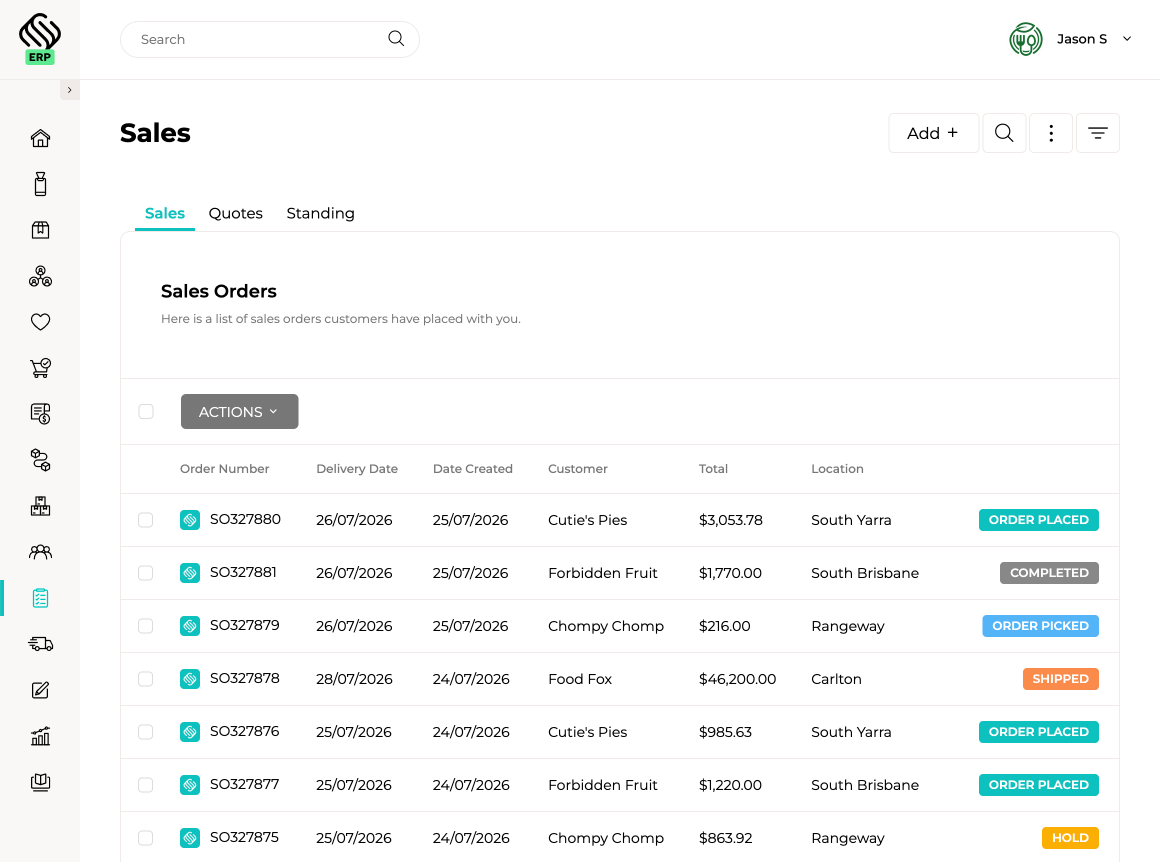
View case studyBring sales orders from Square, Shopify, WooCommerce, Ordermentum, Wedderburn and other connected systems into one central workflow. Whether an order comes from ecommerce, retail, wholesale, a sales rep, Supply’d Lite or your own team, Supply’d keeps customer pricing, inventory, production and fulfilment connected from order through to delivery.
Move confirmed orders directly into production, inventory allocation, picking, packing, delivery and invoicing. Your team can see what has been ordered, what needs to be produced, what is ready to pick and what still requires attention, all within one connected workflow.

 Powered by Supply'd Intelligence
Customers should not need to change how they order just to save your team from retyping every line. Smart Order Inbox reads PDF purchase orders sent by email, extracts the products, quantities and delivery details, and creates a sales order ready for review.
 Connected Through Supply'd Lite
Supply’d Lite gives wholesale customers a free, simple way to place orders using their own products, pricing and ordering rules. Orders flow directly into Supply’d ERP, reducing phone calls, emails and manual entry while making it easier for customers to buy from you.
Explore Supply'd LiteSet up recurring orders for customers who buy the same products each week, fortnight, month or quarter. Supply’d automatically creates each order according to the schedule, with the option to review or adjust quantities before it moves into fulfilment.
| Description | Qty | Amount |
Create and send professional quotes from any device, manage expiry dates and convert accepted quotes into sales orders without entering the information again. Customer pricing, products and terms remain connected as the quote moves into fulfilment.

Explore how food manufacturers, bakeries, wholesalers and retailers use Supply’d ERP to run their operations.
Book a demoSupply’d ERP is built around the workflows food manufacturers, distributors and retailers rely on every day.
Supply’d is built around the way food and retail businesses actually operate. We combine deep industry understanding with connected technology to deliver order management software that improves control, reduces manual work and connects teams across the operation.
Sales order management software helps businesses capture, process and fulfil customer orders in one connected workflow. Supply'd brings together customer pricing, inventory, production, picking, delivery and invoicing so orders do not need to be managed across disconnected systems and spreadsheets.
Yes. Supply'd can bring orders from supported retail, wholesale, ecommerce and ordering platforms into one central order workflow. This gives your team one place to manage orders regardless of where the customer placed them.
Supply'd supports integrations with platforms including Square, Shopify, WooCommerce, Ordermentum and Wedderburn, along with Supply'd Lite and other supported API connections. The exact information exchanged depends on the capabilities and configuration of each integration.
Yes. Wholesale, retail, ecommerce, sales rep and internally entered orders can be managed within the same platform. Each order can retain the pricing, products, delivery requirements and fulfilment workflow relevant to its customer and sales channel.
Yes. Sales representatives can create and update orders using the products, pricing, terms and ordering rules assigned to each customer. Orders then flow into the same production, warehouse and fulfilment workflows as orders received through other channels.
Yes. Orders can be entered directly by your team from supported devices. Customer details, product ranges, pricing, payment terms and delivery information can be applied automatically to reduce repeated entry and order errors.
Smart Order Inbox reads supported customer purchase orders received by email and extracts information such as products, quantities and delivery details. Supply'd then creates a draft sales order for your team to review instead of manually re-entering every line.
Yes. Supported PDF purchase orders can be read through Smart Order Inbox and converted into draft sales orders. Your team can review the recognised products, quantities and customer information before confirming the order.
Smart Order Inbox creates a draft order ready for review. Your team remains in control of checking the customer, products, quantities, pricing and delivery details before the order moves into fulfilment.
Yes. Wholesale customers can use Supply'd Lite to place orders using their own products, pricing and ordering rules. Orders flow directly into Supply'd ERP without your team needing to re-enter them.
No. Supply'd Lite provides customers with a simple way to order from businesses using Supply'd ERP without requiring them to purchase the full ERP platform.
Yes. Customers can be assigned their own products, price lists, units, quantity multiples and ordering rules. This ensures they only see and order the products available to them through connected ordering workflows.
Yes. Customer-specific and customer-group pricing can be applied automatically when an order is created. Pricing can also vary by product, unit, carton quantity, order quantity, location or sales channel.
Yes. Minimum order values, carton quantities, quantity multiples and other ordering rules can be connected to products and customers. These rules help reduce invalid orders and ensure customers order in quantities your business can fulfil efficiently.
Yes. Customer payment terms, credit settings and other commercial details can be connected with the customer record and applied throughout the sales order and invoicing workflow.
Yes. Standing orders can be scheduled for customers who regularly purchase the same products. Orders can be created weekly, fortnightly, monthly or according to another agreed schedule, with quantities reviewed or adjusted as required.
Yes. Automatically created standing orders can be reviewed and adjusted before they move into production, picking or delivery. This allows regular orders to remain flexible when customer requirements change.
Yes. Your team can create professional quotes using the customer's products, pricing and terms, set expiry dates and send the quote for review before an order is confirmed.
Yes. Accepted quotes can be converted into sales orders without re-entering the customer, products, quantities or pricing. The resulting order can then move directly into the normal fulfilment workflow.
Yes. Products, quantities, delivery dates, customer instructions and other order details can be updated according to your permissions and workflow. Connected production, inventory and fulfilment requirements can then reflect the revised order.
Supply'd keeps the sales order connected with inventory, production and fulfilment as changes are made. This helps your team understand what has changed and adjust downstream work without rebuilding the entire order manually.
Yes. Sales orders are connected with inventory information so teams can understand what is available, what may need to be purchased or produced and what requires attention before the order can be fulfilled.
Yes. Demand from confirmed sales orders can feed into production planning and manufacturing workflows. This helps production teams understand what needs to be made, in what quantity and by when.
Yes. Confirmed orders can move into warehouse picking and packing workflows without being manually recreated. Supply'd supports guided picking, batch selection, packing and order status updates across supported devices.
Yes. Supported scanners and mobile devices can be used for guided picking, batch selection, packing and fulfilment. This helps warehouse teams confirm products and quantities while work is being completed.
Yes. Orders can be managed when only part of the requested quantity is available or ready. The remaining quantity can continue through the relevant inventory, production or fulfilment workflow according to your operational process.
Yes. Delivery dates, locations, zones, instructions and other customer requirements can be connected with the order. This information can then flow through picking, packing, delivery planning and proof-of-delivery workflows.
Yes. Orders requiring delivery can flow into Supply'd delivery planning and routing workflows. Delivery teams can then manage vehicles, routes, stops, customer instructions and proof of delivery.
Yes. Order documents and customer communications can be generated from the information held in Supply'd. The exact notifications and documents used can be configured around your sales and fulfilment process.
Yes. Sales orders can move through fulfilment into invoicing, reducing the need to re-enter customer, product, quantity and pricing information. Financial information can then flow to supported accounting platforms.
Yes. Supply'd integrates with supported accounting platforms including Xero and MYOB. Sales, customer and financial information can flow into the accounting workflow according to the integration and implementation scope.
Yes. Orders received through connected platforms, Supply'd Lite and Smart Order Inbox can flow directly into Supply'd ERP, reducing the need for staff to manually recreate orders from emails, portals and external systems.
Yes. Teams can track orders as they move through entry, review, production, picking, packing, delivery and invoicing. This gives customer service and operations teams clearer visibility over what has been completed and what still requires attention.
Yes. Permissions can be configured so sales, customer service, production, warehouse, delivery and accounts teams can access the information and actions relevant to their roles.
Supply'd provides API and integration capabilities for supported systems. Additional integration work may be possible where a business uses a specialised ordering, point-of-sale, ecommerce or customer platform.
Yes. Supply'd is designed for food businesses managing orders across multiple customers, locations and sales channels. Connected ordering, production, warehouse and delivery workflows help teams process greater order volumes without relying on equivalent growth in manual administration.